Codetown
Codetown ::: a software developer's community
Apple Watch paired with iPhone

I recently read an article describing how to pair an Apple Watch with an iPhone. Looks great. You can leave your iPhone someplace and then use your Apple Watch as a phone. I don’t know anything about Apple watches, but they have them at Costco and of course at the Apple Store. What’s the latest, best one to get And Ann what do you know about this idea?
https://youtu.be/bCKxZ9PUofI?is=oJWZCf8EehitjhgM
ChatGPT: The idea is real, and for a lot of people it’s one of the best reasons to own an Apple Watch.
Here’s how it works:
• Your Apple Watch pairs with your iPhone during setup.
• If you buy a GPS + Cellular model and activate a cellular plan (typically about $10/month through your carrier), you can leave your iPhone at home and still:
• Make and receive phone calls
• Send and receive texts
• Use Siri
• Stream music and podcasts
• Use Apple Maps
• Pay with Apple Pay
• Call emergency services
Without the cellular model, the watch still works away from your iPhone if it’s connected to Wi-Fi, but its capabilities are more limited.
The best Apple Watch right now
There are three main choices:
1. Apple Watch Ultra 2 – Best overall
• Biggest battery (typically about 2 days)
• Brightest display
• Extremely durable
• Best GPS
• Excellent if you’re outdoors a lot
• Most expensive (around $800)
For most people, it’s more watch than they need.
2. Apple Watch Series 10 – Best choice for most people
• Thin and comfortable
• Large, bright screen
• Fast charging
• Great health features
• Available in GPS or GPS + Cellular
This is the model I’d recommend for the vast majority of buyers.
3. Apple Watch SE (2nd generation) – Best value
• Less expensive
• Does calls, texts, fitness tracking
• Available with cellular
• Doesn’t include some of the newest health sensors
About leaving your iPhone behind
People often use their watch when:
• Going for a walk
• Playing golf
• Running errands
• Going to the gym
• Walking the dog
You simply wear the watch and leave the phone at home. As long as you have the cellular version with an active plan, you’ll still receive calls and texts on your watch.
Health features
Even if you don’t consider yourself a “fitness person,” Apple Watches have some very useful features:
• Fall detection
• Emergency SOS
• Heart rate monitoring
• ECG (Series 10 and Ultra 2)
• Sleep tracking
• Activity reminders
• Medication reminders
These features are one reason many people buy one.
Buying at Costco vs. Apple
Costco
• Often has slightly lower prices or bundles.
• Excellent return policy and warranty support through Costco’s membership benefits.
Apple Store
• Staff can help you choose the right size and band.
• They’ll pair it with your iPhone and show you how to use it.
• Easy if you’re new to Apple Watch.
My recommendation
Since you mentioned you’re new to Apple Watches and are interested in using it as a phone, I’d suggest:
• Apple Watch Series 10
• GPS + Cellular model
• 45 or 46 mm size (depending on what fits your wrist comfortably)
The extra cost of the cellular version is worthwhile if your goal is to leave your iPhone behind.
One question that will help narrow it down: Which iPhone do you have? The Apple Watch requires a relatively recent iPhone running a current version of iOS, so I’d like to make sure your phone is compatible before recommending a specific model.
Comment
Happy 10th year, JCertif!
Notes
Welcome to Codetown!
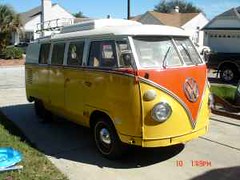 Codetown is a social network. It's got blogs, forums, groups, personal pages and more! You might think of Codetown as a funky camper van with lots of compartments for your stuff and a great multimedia system, too! Best of all, Codetown has room for all of your friends.
Created by Michael Levin Dec 18, 2008 at 6:56pm. Last updated by Michael Levin May 4, 2018.
Looking for Jobs or Staff?
Check out the Codetown Jobs group.
InfoQ Reading List
Uber Moves beyond CPU Cores with Performance-Aware Scheduling for Stateful Workloads

Uber has introduced Normalized Compute Units (NCUs) to make CPU allocation more consistent across its highly heterogeneous server fleet.
By Craig RisiHow Anthropic Redesigned Source Control for AI-Driven Development
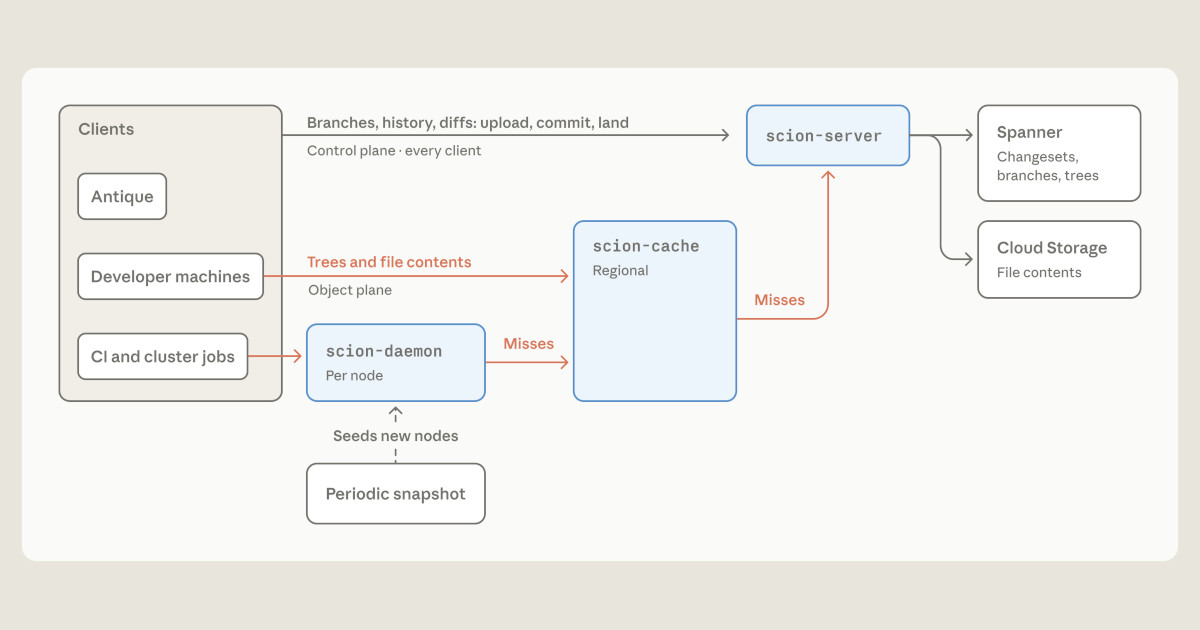
Anthropic recently detailed how it migrated its monorepo from Git to Scion. Scion is a source control system that moves repository operations to the server side and uses content-addressed storage and tiered caches for agent and CI workloads. The design sacrifices offline independence for less local data and shared infrastructure.
By Eran StillerPresentation: Serving LLMs at Scale: The Hidden KV Cache Advantage

Khawaja Shams shares a distributed systems perspective on scaling LLM inference stacks efficiently. He discusses practical strategies for optimizing GPU utilization, managing KV cache memory cliffs, leveraging tiered storage, reducing tail latency, and implementing disaggregated prefill and decode architectures to improve overall fleet performance, cost economics, and availability.
By Khawaja ShamsAWS Shows Use of AI Agents to Triage Linux Kernel CVEs
Engineers from Amazon Web Services (AWS) have described how the team that maintains the Linux kernel for EC2 infrastructure handles kernel CVEs. The process combines an automated filter, an AI agent and human review. The team also argues that it needs to move to newer long-term-support (LTS) kernels, as older branches collect fixes that are never backported.
By Matt SaundersCloudflare and VoidZero Introduce tsrs: An AI-Generated Rust Port of TypeScript

Cloudflare, VoidZero and Max Schwenk announced tsrs, an experimental Rust port of the TypeScript compiler, built with the TypeScript team's involvement. Cloudflare claims up to 8x faster checking and 70% less memory than TypeScript 7.0, though one test against 7.1 beta showed 2.7x. It lacks watch mode and a language server, and exits with code 2 on type errors.
By Daniel Curtis
© 2026 Created by Michael Levin.
Powered by


You need to be a member of Codetown to add comments!
Join Codetown